
G-Lock Software Email Processor
Automate Extracting Data from Inbound Emails, Reformat and Manipulate It the Way You Need, Export Extracted Data to Different Locations, Eliminate Manual Data Entry, and Make Your Workflow Smarter
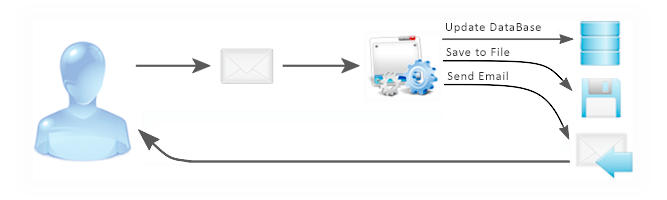
G-Lock E-mail Processor is used by businesses of all sizes to parse and extract data from messages, extract data from TEXT, HTML, CSV, PDF attachments, manage bounced and unsubscribe emails, convert message content into database records, process emails from local or network folders and much more, 24 hours a day, seven days a week.
Rather than having to check each email manually, G-Lock Email Parser automatically checks your accounts on a regular basis and processes each message in the background, freeing up your valuable time.
This solution combines an unrivaled feature set with world-class support and virtually infinite flexibility, at a fraction of the price charged for competitive programs.
New to G-Lock Email Processor? Just follow these 3 simple steps:
- Take Our Product Tour
- Download Free Trial and Try It Absolutely FREE for 30 days!
- Invest in Your Own "Virtual Assistant"
How many hours do you spend for…
Copying and pasting shipping information?
Keeping database up-to-date?
Sending orders and reports to buyers?
Entering tracking numbers?
Copying and pasting accounting records?
Is it stopping you from growing your business?
Chances are you are spending valuable hours for maintaining your business or paying someone to maintain it.
Instead of this, you should be growing your business.
What if you could automate everything?
With G-Lock Email Processor, you can automate repetitive tasks, reduce human error, eliminate complexity, optimize your working time, and SAVE MONEY while not compromising productivity.
To help you decide whether or not G-Lock Email Processor is worth the investment, let's do some maths…
You pay $30/hour to one full time employee, which makes $1,200 per week and $4,800 per month.
With G-Lock Email Processor, you invest $595 one time and SAVE $4,205 and then $4,800 each month.
So, G-Lock Email Processor reduces your budget for email processing by $9,005 ($4,205 + $4,800) at minimum.
Since G-Lock Email Processor can replace 2, 3, 4 etc. full time employees, your savings are doubled, tripled, quadrupled etc.
Download Free 30-Day Trial
System requirements: Windows® 10, Windows® Server 2008 or higher
The benefits of using G-Lock Email Processor for your business are:
1 Complete and Accurate Data. Data parsing automation ensures the capture of all relevant information from a variety of sources, giving you a hyper-accurate CRM data you can actually use.
2 More free time.You don’t have to waste valuable working time on data extraction and entry, freeing up a significant portion of your work week for other business tasks.
3 Flexible control. You define yourself what emails should be processed and how. Don’t want particular emails to be captured? Simply adjust the message filter in your “rule”. You have a full control over what’s handled and what’s not.
Let G-Lock Email Processor automate your business processes… optimize your customers relationship… and save you time and money. Our email automation software quietly works in the background, outperforming even the most competitive secretary!
The great thing about G-Lock Email Processor is that we have the 30-day fully functional trial version that you can download and use to make sure that our email parser is something you like before you invest in it.
So, don't take our word for it. Just install the free 30-day trial version of G-Lock Email Processor onto your computer, tell your "virtual assistant" what it must do with the emails [create a rule]… and let it process your messages 24 hours/7 days a week while you're spending time with your family and friends, or focusing on other aspects of your business growing your sales.
What other users have said about G-Lock Email Processor:
With the automation G-Lock Email Processor provides we reduced our new customer setup time and our support calls by half. Previously, the files we process arrived via FTP. Most of our clients are offshore and use a satellite connection, this meant that, if they could even connect, many of the files were corrupt or incomplete. This is not a problem when received as an email attachment. Now we process them 24 hours a day/7 days a week with no problems. Thanks G-Lock team!
— Randy Douglas
www.jwtoups.com
Read other GEP reviews →
Download Free 30-Day Trial
System requirements: Windows® 10, Windows® Server 2008 or higher
Here is exactly what G-Lock Email Processor can and will do for you:
- Automatically check your accounts at a regular basis and process your messages in the background — time and efficiency are valuable for any business or organization. With G-Lock Email Processor you save hours of manual email processing work!
- Process emails from local or network folders — you can handle your old messages and have the email processor sort them in the most convenient way.
- Convert message content into database records — you take care of your health and strength releasing yourself from tedious work, day by day
- Save the data extracted from the message to a file — you don't lose any important data since the automatic email software saves it, so you don't need to ask the sender to re-send the message.
- Save message attachments to the disk — if the attachment is received in a zip file, our automatic email software will unzip it and saved to the folder of your choice.
- Create a PDF or HTML report – fast and easy way to create invoices, purchase reports or any other kind of reports and send them to the recipients without any delay!
- Integrate extracted data into Microsoft Outlook — you can quickly create contact item in Outlook, convert email into task in Outlook, create note item in Outlook or convert email into appointment item in Outlook calendar using G-Lock Email Processor.
- Optimize your business and customer service by sending auto-replies – you don't pay for a third-party auto-responder when you use automatic email processing.
- Keep your list clean by processing bounced and unsubscribe emails — you get a better delivery rate!
- Automatically convert extracted data using MS Windows script – the email processor delivers the output data in the format compatible with your database
- Extract URL from email and process data from web pages and RSS feeds — automatic email processing is a big time saver when you receive many emails that involve clicking a link! Plus, G-Lock Email Processor can parse an email message and fire a XML post based on extracted data.
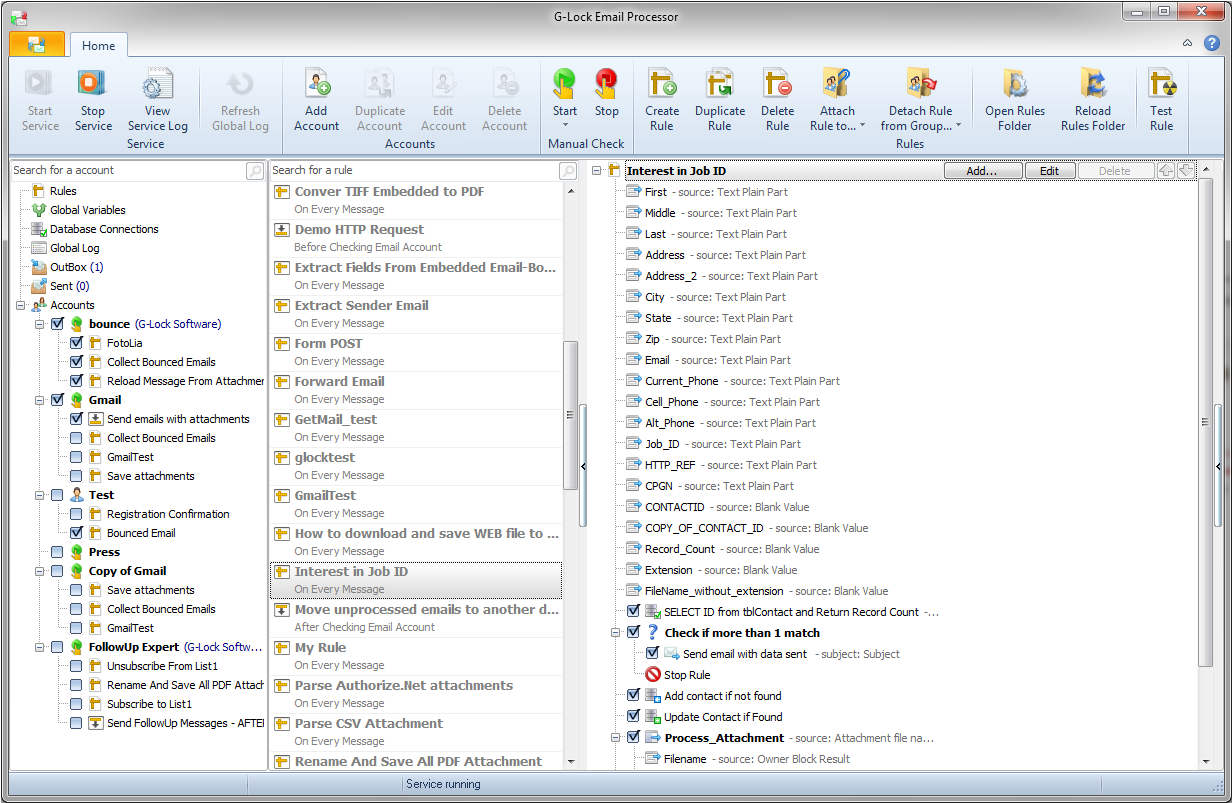
Click on the image to enlarge it
Click here for more screenshots
Get a free FULL trial of this software right away, and experience all its features!
We allow anyone, including you, the chance to test-drive our G-Lock Email Processor full version for 3 days, without any prior activation.
Once the automated email software trial expires, you can get a free key which extends your trial period for another 27 days.
When this period is over, you should either register purchase a license to continue using the program, or discontinue using G-Lock Email Processor. You can also purchase the automated email software license during your trial period. Upon your order completion you'll get a new personal key via email.
Download Free 30-Day Trial
System requirements: Windows® 10, Windows® Server 2008 or higher