
Keep Your Privacy When Surfing the Net by Using Proxy Servers
Proxy Analyzer is a tool designed to manage a database of proxy servers located all over the world. This program is essential for those who are concerned about their privacy and who want to surf the web anonymously.
Are you aware that while you're comfortably surfing the Internet certain web sites know about you when you visit them? Are you aware that everything you do on the net can be easily traced back to your computer? If you belong to those people who would like to gain a higher degree of anonymity and privacy on the net, you need a proxy server. A proxy server is a computer, which stands between you and the site you want to visit so that no information about you but the information about the proxy is visible to the site you're visiting. |
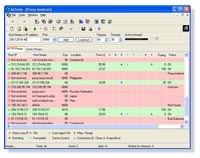
Using the AATools Proxy Analyzer you can check SOCKS Proxies and see their levels – 4, 5.
In addition, the Proxy Analyzer can find different types of HTTP proxies:
- Transparent proxies (not anonymous, simply HTTP) do not change the header fields and transfer your real IP. Such proxies are not applicable for security and privacy while surfing on net. You can use them only for network speed improvement.
- Anonymous proxies do not show your real IP no more and change and/or hide the header fields.
- Distorting (Gateways) proxies. Such proxies alter their own IP address (your real IP is also hidden), change the header fields that it looks like the real browser connects without using a proxy. People administrating web sites will think that you are not using any proxies.
The Proxy Analyzer can find proxies which support FTP connect method. These proxies may be used, for example, in download managers that support this kind of proxy.
The Proxy Analyzer can calculate approximate data transfer speed through a HTTP proxy server.
HTTP proxy servers have several anonymity levels. It depends on purposes a proxy is used for, so an anonymity requirement is not always an essential one.
According to how environment variables are "hidden" by proxy servers, the Proxy Analyzer rates HTTP proxy servers as follows:
1. Not anonymous (0 points) – these proxies let a web server know that a proxy server is used and spill the client's IP address:
REMOTE_ADDR = proxy IP/your IP
HTTP_VIA = proxy IP/your IP
HTTP_X_FORWARDED_FOR = your IP
The task of such proxies, as a rule, is information cashing, organization of joint access to Internet of several computers, etc.
2. Simple Anonymous (5 – 100 points) – though these proxy servers let a remote computer (web-server) know that a proxy is used, they do not transmit the client's IP address. They replace the client's IP with their own IP:
REMOTE_ADDR = proxy IP
HTTP_VIA = proxy IP
HTTP_X_FORWARDED_FOR = proxy IP
Plus, there may be other signs of a proxy server use:
– HTTP Cache Control, HTTP Connection Close variables;
– 'mail', 'cache', 'proxy', etc. words in the Host Name box;
3. Distorting (128 points) – as well as simple anonymous proxy servers these proxies do not hide the fact that a proxy server is used. However a client’s IP address (your IP address) is replaced with another (arbitrary, random) IP. So, these proxies distort your IP address from the point of view of a webserver:
REMOTE_ADDR = proxy IP
HTTP_VIA = proxy IP
HTTP_X_FORWARDED_FOR = random IP address
4. High anonymity proxies (100 – 128 points) – they do not send your IP address to a remote computer. Moreover, they do not inform that a proxy server is used! So, a web server "thinks” that it works directly with a client:
REMOTE_ADDR = proxy IP
HTTP_VIA = not determined
HTTP_X_FORWARDED_FOR = not determined
HTTP connection: keep alive
That means the values of variables are the same as if a proxy is not used, i.e. not determined, with the exception of one very important thing – proxy IP is used instead of your IP address.
Here is the summary of what you can do with the Proxy Analyzer:
- Check the anonymity degree of proxy servers
- Check SOCKS Proxy and see their levels – 4, 5
- Choose to use only those proxies that meet particular anonymity requirements
- Find the fastest anonymous proxy server in your region
- Scan each server, check its response time, confirm its anonymity
- Choose the best candidate as your default proxy
- Tests proxies for HTTP and Secure HTTP (SSL): HTTPS support
- Check only one proxy, or list of proxies simultaneously
- View results of testing in your favorite browser
- Use multiple threads to check your proxy list faster
- Save only bad or only good proxies to a file
Searching Proxy Servers
The best technique to search for proxy lists is to use a search engine www.google.com. Type the keywords, for example, "proxy server list", or "proxy IP:port" and you will get numerous web pages with proxy lists. Save a proxy list to a text file for further loading into the Proxy Analyzer.
Testing Proxy Servers with the Proxy Analyzer
- Click Load List in the Proxy Analyzer to load a list of proxy servers. Or, you can directly copy a proxy list from the web page to the Proxy Analyzer if you click the right mouse button on the HTTP Proxys window and select Paste From Clipboard from the menu.
- Click Start Scanning button.
- Click Save Results button on the Toolbar to save good proxy servers.
Using Proxy Servers
With two mouse clicks in the Proxy Analyzer, you can use a good proxy server to anonymously surfing the Internet. Just select a proxy server, click the right mouse button on it and then select Set as (IE) Proxy for -> All Connections. To switch between the proxies, disable the proxy you are currently using (Disable (IE) Proxy for -> All Connections), select an other proxy and set it as a default proxy server for all connections on the Internet.
Be aware that a proxy's lifetime may be shorter than you think. This is because the organization maintaining the proxy server may have network problems, maintenance outages, user overload, and so on. It will be prudent from your side to test your proxy servers every time before you are going to work with them.