|
List hygiene plays a role in the delivery race. It is important to maintain a
clean mailing list and remove bounced/undeliverable emails because a lot of ISP
mail servers have been known to block a sender's email domain for repeated
sending messages to email addresses from a non-existing domain.
Most spammers don't have actual email addresses. Spammers are known to use a
software that takes random email addresses and they do not care about bounced or
undelivered emails. Hence, ISP assumes that the sender is trying to spam and may
block or blacklist his email domain. It will be quite problematic to resolve the
matter (block/blacklist) and the only thing to do is to register a new email
domain or use another email domain to send emails out.
According to Return Path, the average email address lifespan is approximately
three years. What happens to old, abandoned addresses? Rather than kill them,
many ISPs recycle them to new users or add them to filters as "spamtrap"
addresses. (A spamtrap is an email address used by a filtering service to
identify spam. Many are created by filtering services and placed in public
domains, such as chat rooms and message boards.) Either way, email sent to a
spamtrap doesn't bounce. It's received by someone and considered spam, or sent
straight into a blackhole (deleted), along with all the rest of your messages to
that ISP's users. Thought cleaning your list wasn't high priority? It's
mandatory.
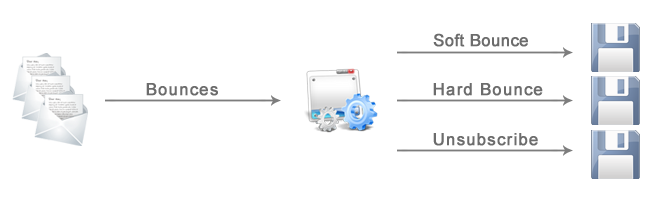
Using Email Processor you can easily
catch 'dead', bounced/undeliverable emails and remove them from your mailing
list. Email Processor is supplied with the Bounced
rule that will help you to detect bounced messages, extract email addresses from
these messages and save the addresses to a file. Further you can load this file
into the Exclusion List of your email sending software, or delete bounced email
addresses from your database at all.
Why does it happen that we often get email messages bounced back to our email
account?
Whatever method of sending email messages you use, your emails are always
subject to the basic process of the
SMTP servers commands
for acceptance or rejection of
emails by the
recipient's
ISP mail server.
Just like everything on the Internet, delivering a message is not a simple
process. Every email must successfully pass through numerous phases before it
reaches its intended destination.
First of all your emails are sent from your send mail software to your
ISP mail server.
After your
ISP mail server
gathered all your
emails and put them
in queue, it then sends your messages out to each recipient's
ISP mail server by
establishing a conversation with a
SMTP server, i.e
connecting to the port 25 on the recipient's SMTP mail server.
The recipient's mail server tells the sender's server if it is prepared to
receive mail. If it is not, the sender's mail server terminates the connection
and will try again later. Once emails are accepted by the recipient's ISP mail
server, they are considered as delivered.
Many ISP mail servers are set up so that they limit the amount of messages
you can send in quantity, or in the server access time. In this case you may
experience a server-time-out (connection terminated) error message.
Some mail servers reduce the number of simultaneous connections from one IP
address. It means that though your ISP mail server accepted all your emails,
they may not be delivered or accepted by the intended recipient's ISP mail
server.
It is also highly possible that your customers mail client and/or their
corporate mail server have filters that delete messages with inappropriate
wordings (free, porn, viagra, etc.) in Subject, TO, FROM as well as in the
message body that will result in your emails being deleted or bounced.
Sending messages with a fake or non-existing email address in FROM: header
field usually results in bounced (undeliverable) mail and you may get an error
message like this (or ISPs simply accept and delete your emails without sending
you any notification):
572 Relay not authorized or Not local host... not a gateway
550 This address is not allowed or Requested action not taken: mailbox
unavailable
Most SMTP servers accept email messages addressed to someone within their
domain only. Otherwise, you will receive your emails bounced back with the
error:
551 User not local, please try <forward-path> or Invalid Address: Relay
request denied
Or, they will be considered as spam and deleted without notifying you.
Though your ISP mail server accepted your emails and relayed them to the
recipients, they may not be delivered due to other reasons like: the recipient's
mail server is busy, anti-virus firewall, no such domain, quota exceeded,
unknown user, inactive mailbox.
|