
version 7.46.3, February 4, 2020
Added: sorting of group names in the alphabetical order in the “Copy Exclusion List to” menus
version 7.46.2, January 10, 2020
Added: Amazon SES API endpoints for new regions Asia Pacific (Mumbai), Asia Pacific(Sydney), and Europe (Frankfurt).
Changed: signature v3 to signature v4 for the request authentication to the Amazon SES API.
Latest upstream components updates.
version 7.45.1, April 24, 2019
Added: API method to move email contacts from one group to a different group.
Changed: format of the internal test id for spam tests. (Since the id format change older versions of G-Lock EasyMail7 are not compatible with spam tests).
Latest upstream components updates.
version 7.44.8, October 26, 2018
Fixed: minor internal bugs.
Updated: Bounce Handler rules.
Latest upstream components updates.
version 7.43.7, June 20, 2018
Fixed: sporadically message sending was stuck in the Outbox on some computers.
Fixed: G-Lock Analytics login.
Latest upstream components updates.
version 7.43.6, May 10, 2018
Fixed: the Timeout error on some computers.
version 7.43.5, April 27, 2018
Fixed: the Bounce Handler was freezing on some computers.
version 7.41.3, November 15, 2017
Added: “Copy from [segment].[group]” option to the “New Segment” menu that allows to create a new segment by copying an existing segment from a different group.
version 7.41.2, November 2, 2017
Fixed: bug introduced in the v7.41.1 when the program did not add the open tracking code to the message with email tracking enabled.
Updated: Bounce Handler rules.
version 7.41.1, October 10, 2017
Added: “Create New Group from Search Results” option in Contacts that allows to copy the contacts found in all the groups to one new group.
Added: export of the “Diagnostic_Code” field in addition to the “Email”, “Bounce_Type”, and “Bounce_Date” fields in the Bounce Handler.
Added: ability to use X-CC: and X-BCC: custom header fields for CC and BCC email options. X-CC: and X-BCC: must be written from upper case letters. You can add only a single email address after X-CC: and X-BCC:. Example: X-CC: [email protected].
Fixed: the EasyMail7 Server crash when the Bounce Handler and email sending were working for the same group at the same time which resulted in duplicate emails sent to some recipients.
version 7.40.1, September 26, 2017
Added: compatibility with email templates created by email service providers like MailChimp, template editors like beefree.io and other.
Added: ability to personalize action pages used in the subscription process by merging form fields in the page source.
Fixed: incorrect merging of values of auto-incremented dynamic fields.
Fixed: sending of multiple email copies to some recipients on computers with a slow HDD (when the message was sent to more than one group at a time and the email account had a limitation per hour/day).
Updated: Bounce Handler rules.
Latest upstream components updates.
version 7.30.1, June 27, 2017
Changed: template import (the file name is used as a template name that can be changed by the user).
Changed: support of long custom headers in Email Account -> Custom Headers.
Fixed: issue with the FTP module introduced in the previous version.
Latest upstream components updates.
version 7.26.5, June 6, 2017
Fixed: saving an email as a draft from the scheduler with email analytics turned to On (the draft was saved with a broken content).
Complete refractory of the bounce email detection rules.
version 7.25.4, February 10, 2017
Fixed: the creation of segments in contact groups. When the segment had more than one selection criteria, the program selected contacts from multiple groups.
version 7.25.3, January 25, 2017
Added: new options to the “Bulk Actions” menu: Delete all except loaded, Subscribe all except loaded, and Unsubscribe all except loaded. These options can be useful to the users of G-Lock Analytics who can export the recipients who opened the last few campaigns and use the “Delete all except loaded” or “Unsubscribe all except loaded” option to delete inactive recipients who did not open any of the last few campaigns from the group.
Fixed: load and installation of templates from the Template Store.
Fixed: number of the Unsubscribed recipients in the Email Statistics.
Fixed: work of autoresponders when the EasyMail7 Server is installed on a remote computer or server.
version 7.25.2, January 11, 2017
Fixed: the work of the scheduler after the scheduled message was edited.
version 7.25.1, January 10, 2017
Added: performance improvements and general fixes.
Updated: Bounce Handler rules.
Latest upstream components updates.
version 7.21.6, October 25, 2016
Added: the drag-and-drop capability to bulk insert images into the message.
Fixed: “Access violation…” error in automated and scheduled emails that appeared when the message was saved more than one time.
Fixed: the program did not change the group in the Edit Message window if you changed the group in the autoresponder settings.
Fixed: the program did not remember the position of the main window when a part of the main window was out of the screen at the time you closed it (done for dual monitor systems).
Updated: Bounce Handler rules.
version 7.20.5, October 18, 2016
Fixed: the Bounce Handler unsubscribed hard bounce and FBL emails in the first group where the email was found only. Now it unsubscribes them in all groups.
Fixed: the program did not remember the selected number of contacts per page in the group.
version 7.20.4, September 20, 2016
Fixed: the program did not remember the group name in the “Select default group to execute bounce handler action for” in the Bounce Account settings.
Updated: Bounce Handler rules.
version 7.20.3, August 26, 2016
Added: ability to create a segment by the subscription date. For example Date(Subscribe_Date) equals strftime(‘%m-%d’,’now’,’-5 day’) selects all contacts subscribed 5 days ago.
Fixed: the program was not sending a follow-up email when a link was clicked in a previous email.
Updated: Bounce Handler rules.
version 7.20.2, August 22, 2016
Fixed: dynamic fields in the email Subject line.
version 7.20.1, August 2, 2016
Added: several GUI changes and improvements.
Added: performance improvements and general fixes.
Updated: Bounce Handler rules.
version 7.15.2, June 22, 2016
Fixed: sending speed on some SMTP servers.
Removed: mailto: links from tracking.
version 7.15.1, May 27, 2016
Changed: web tracking (Google Analytics and Piwik) and scripting options are moved to the new Advanced tab in the Edit Message window.
Changed: insert options such as insert a table, attachment, picture, symbol, link and line are moved to the new Insert tab.
Changed: local SpamAssassin message checker is removed because of its outdated rules. All spam tests are moved to GlockApps.
Changed: when you do a spam check and email placement test, the message is closed and saved to Drafts.
Changed: new message loads with a clean template without any additional source code.
Changed: “Duplicate Template” option is moved from the menu bar to the drop down menu when you right-click on the template.
Changed: the Workplace menu is renamed to Settings.
Changed: template Categories are renamed to Folders.
Changed: the Merge menu is renamed to Dynamic Fields.
version 7.10.2, April 12, 2016
Fixed: some script functions missed in the previous versions.
version 7.10.1, April 7, 2016
Added: message preview for the plain text format.
Changed: Inbox Placement and Spam Filtering Diagnostics tests are transferred to G-Lock Apps. To send Inbox placement tests, you must create an account on G-Lock Apps now. You can do it directly from G-Lock EasyMail7 when you run your first deliverability test.
version 7.10.0, March 18, 2016
Added: “Copy to Clipboard” option to the “DKIM Signature” tab in the Outgoing Mail Account settings to correctly copy the DKIM key.
Fixed: connection problems to the EasyMail7 Server on slow network connections.
version 7.9.9, March 9, 2016
Fixed: unsubscribe link when the email was sent at the same time to different groups, for example to a WPNewsman list and to an internal group.
version 7.9.8, February 29, 2016
Fixed: “Access violation…” error when the program was closed but the “Edit Message” window stayed opened on the background.
Improved: Bounce Handler.
version 7.9.7, January 25, 2016
Fixed: addition of Google Analytics and Piwik tracking parameters to URLs (the program does not duplicate tracking parameters in URLs each message saving).
Improved: ‘List-Unsubscrive’ header field to comply with the Hotmail unsubscribe policy.
Updated: Bounce Handler rules.
version 7.9.6, January 6, 2016
Added: when the “Insert ‘List-Unsubscribe’ field into the message header” option in the Workplace Settings is active, together with the ‘List-Unsubscribe’ header field the program automatically adds the ‘List-ID’ header field to minimize the spam score given to the message by the updated SpamAssassin rules.
Fixed: the program did not add custom header fields to the message if the “Sign email with DKIM signature” option was enabled in the Outgoing Mail Account settings.
Latest upstream components updates.
version 7.9.5, November 30, 2015
Changed: the fields in the “Edit Contact” and “Add Contact” windows display in the same order as they are shown in the group.
Latest upstream components updates.
version 7.9.4, November 5, 2015
Fixed: bug introduced in the version 7.9.3 that caused the “Access violation…” error on the login under a user account.
Fixed: bug introduced in the version 7.9.3 when the program did not remember the days of sending for an automated emails series if you opened the Automated Emails settings.
version 7.9.3, October 29, 2015
Added: “Add” option on the Global Exclusion List menu bar that allows to add a single email address to the Global Exclusion List.
Changed: “It’s time to update your version” popup window appears only for the admin.
Improved: Bounce Handler.
version 7.9.2, October 22, 2015
Fixed: bug introduced in the v7.9.1 when on a clear installation the program created the admin with the restricted rights (user rights).
Fixed: program crash on systems with disabled platform notifications.
version 7.9.1, October 21, 2015
Added: “Delete” button on the menu bar for the Global Exclusion list.
Fixed: bug with the “Return” email address on Windows XP introduced in the v7.9.0. Instead of the “Return” email address, the program used the “From” email address in the Return-Path field causing bounce emails come back at the “From” account.
Fixed: problem with the NTLM authentication when connecting to an Exchange server introduced in the v7.9.0.
Improved: “mailto” unsubscribe link. The program now identifies the contact group where the unsubscribed email address comes from and unsubscribes that contact in the correct group.
version 7.9.0, September 22, 2015
Added: online subscription forms with the built-in automated transactional welcome email feature that doesn’t need API coding.
Added: integration with Shopping Cart Elite.
Added: ability to insert free images from pixabay.com into email templates and messages.
Added: ability to test (regular test and Inbox placement and Spam Filtering Diagnostics test) email messages sent by an automated email series.
Added: “Select default group to execute bounce handler action for” option in the Bounce Handler account settings. It allows you to select an external group to which you want to apply the bounce handler action if the program cannot find the group the message was sent to in the message header.
version 7.8.1, June 8, 2015
Fixed: deletion of sent items from the disk.
version 7.8.0, June 4, 2015
Added: ability to automatically add unsubscribed contacts collected by G-Lock Analytics to the EasyMail7’s Global Exclusion List.
Latest upstream components updates.
version 7.7.8, May 18, 2015
Added: “Birthday” field to the internal groups. Added: segmentation criteria “is greater than”, “is greater than or equals”, “is less than” and “is less than or equals” for all fields in the group.
Fixed: “Input stream has no data. Check Position property” error after editing blocks in the message editor.
Fixed: memory leak in the Automated Emails when sending through Amazon SES API.
Improved: Bounce Handler internal rules.
version 7.7.7, April 16, 2015
Added: ability to test Inbox placement, spam filtering, sender authentication, Gmail tabs placement and delivery duration.
Optimized and increased sending speed through the Amazon SES API.
Latest upstream components updates.
version 7.7.2, March 18, 2015
Improved: work with a large Global Exclusion List.
Improved: Bounce Handler internal rules.
Latest upstream components updates.
version 7.7.1, February 10, 2015
Added: “Paste from Word” option to the message editor.
Added: “Reprocess Unhandled” option to the Bounce Handler that works for external databases only and allows to reprocess unprocessed hard bounce and FBL emails.
Fixed: merge tags. If you use a merge tag in the subject or body, and it does not exist in the group, the program does not populate anything and leaves it blank.
Improved: saving of contacts to a file. Now the program uses the field separator set by default in the system where the EasyMail7 Client is installed which makes the exported fields open correctly in MS Excel — each field in a separate column.
Improved: work of the Bounce Handler with external databases.
version 7.7.0, January 13, 2015
Added: “Sign email with DKIM signature” option to the Outgoing Mail Account settings.
Added: ability to choose and save the “From” field with the template.
Added: %%Group_Name%% field to the Merge menu and undocumented %%Subject%% merge field.
Added: indication (arrow) which column the contacts in the group are sorted by.
Added: if you re-order the columns in the group, the new column order is saved between sessions or focus changes.
Added: “Top Recipients Domains” report to an email tracking overview.
Fixed: sporadic “Exception EORMException” error during the import of csv files.
Fixed: %%Current_Date%% merge field. The date is merged in the format and language taken from the system locale on the computer where the EasyMail7 Server is installed.
Improved: Bounce handler.
Latest upstream components updates.
version 7.6.1, December 10, 2014
Added: ability to use a custom SQL query to update, delete or insert bounce emails into external databases.
Added: throttling stats and “Reset Counters” option to the Outgoing Mail Account settings.
Fixed: “Method ‘cssRules’ not supported by automation object” error on some email messages.
Improved: internal CSS inliner (it automatically disables on old Windows XP with the Internet Explorer 8 systems).
version 7.6.0, December 3, 2014
Added: ability to connect the EasyMail7 with hundreds webapps or CRM through Zapier.
Added: internal css inliner (does not work on Windows XP with the Internet Explorer v8).
Added: “Disable blocks” option to the Edit Message window.
Added: Bounce Handler reports statistics about bounce emails to the “Email Statistics Overview” in the Outbox.
Fixed: the program stopped responding if you had two messages open at the same time trying to copy text from one message to another.
Improved: speed of connecting and opening an address book with a large amount of groups.
Improved: Bounce Handler.
version 7.5.0, November 4, 2014
Added: ability to execute a script during email sending.
Added: ability to create user groups with custom permissions.
Added: SFTP support when uploading images to the FTP server.
Added: “Backup Sent Items” option to the Automatic Backup Settings.
Added: “Save Mapping” and “Load Mapping” options to the “Create New Group” and “Import” window.
Improved: HTML editor.
Changed: backup creation changed to online backup when the EasyMail7 Server does not stop and the program continue working during the backup creation.
version 7.4.0, September 2, 2014
Added: “Get Started” section to the Workplace menu.
Added: predefined SMTP settings for some SMTP providers.
Improved: import speed (on the computer with Intel Core i7 920 CPU and Intel 520 SSD the import of one million emails takes just 30 seconds!).
Improved: Bounce handler.
Latest upstream components updates.
version 7.3.0, August 11, 2014
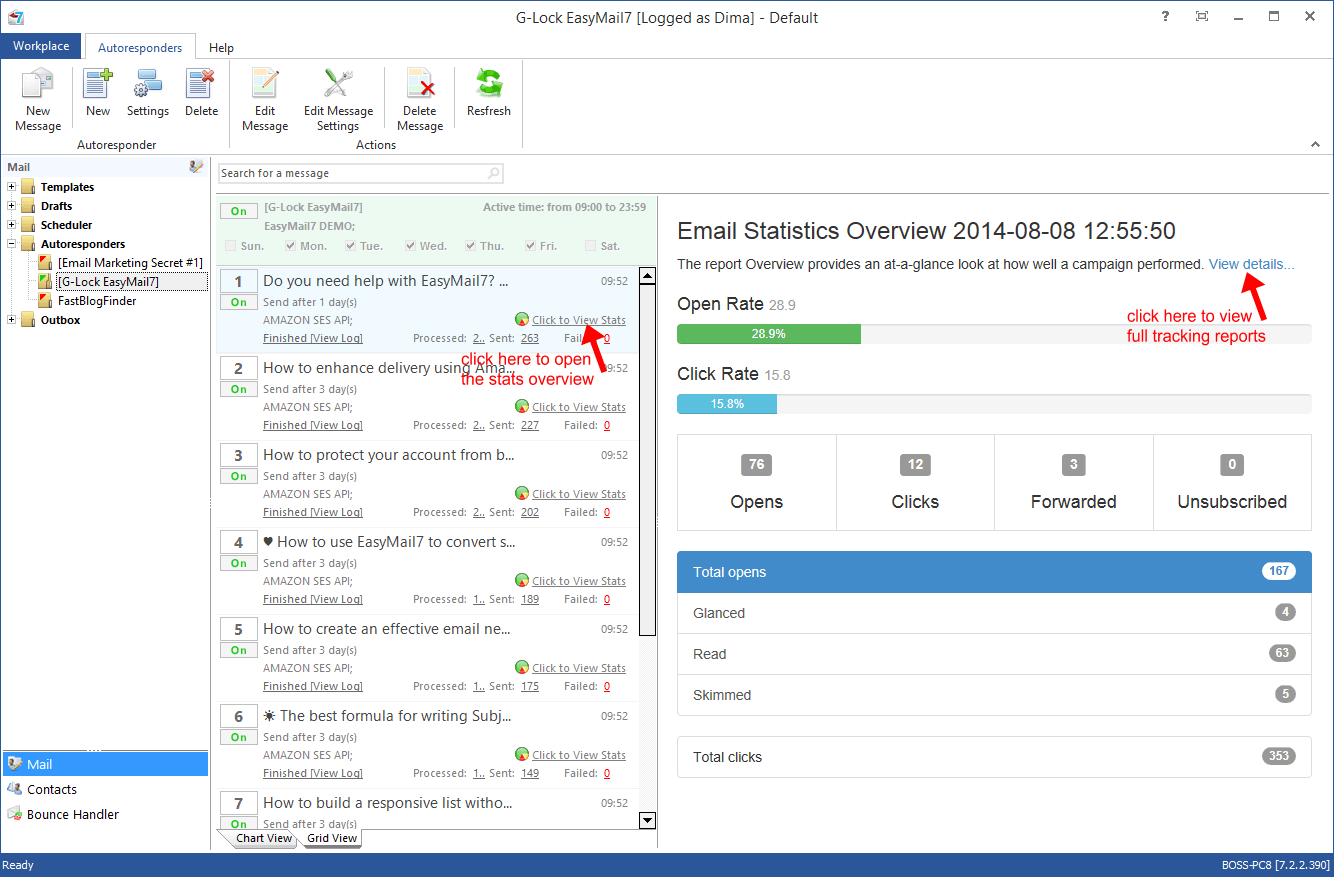
Added: automatic backup feature in the "Manage Server" settings. Now you can manually create the EasyMail7 Server backup at any time or turn the automatic backup creation option to On and let the program create backup at a regular basis without your participation.
You can choose a local or network folder to save a copy of the backup file to. The folder must be located on the computer where the EasyMail7 Server is installed. You can also save backup to a cloud file storage folder such as OneDrive, DropBox etc.
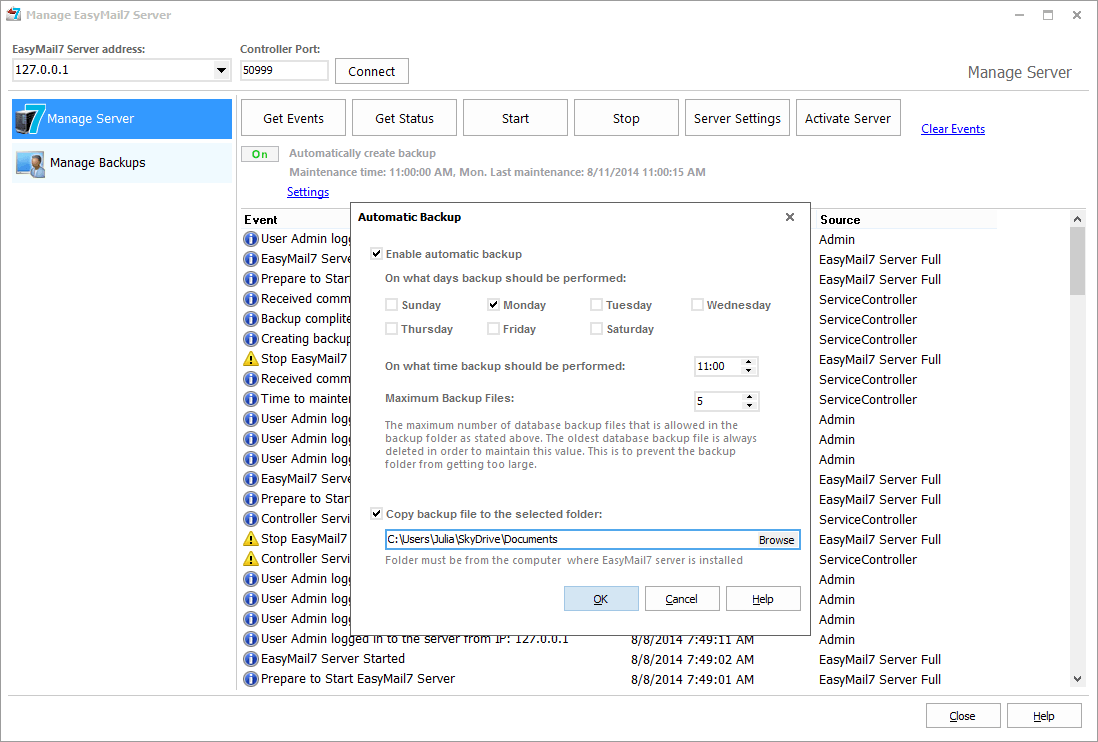
Added: “To email” field in the “Send Test Email” window that allows to send a test message to one or several email addresses separated by commas or semicolons.
1. the Global Exclusion List does not work (if the email address is on the Global Exclusion List, the test message will still be sent to that email);
2. group merge tags in the email do not work. Only the merge tags from the Workplace Settings such as the unsubscribe link and social links work.
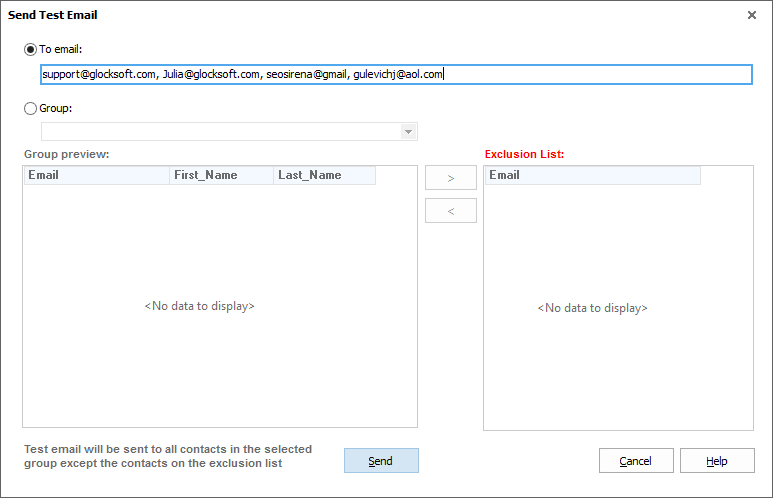
Added: ability to check the email spam score. We built in the SpamAssassin filter that uses a diverse range of tests to identify spam. The filter analyzes the email header and body to determine its spam score. So, you can check your email spam score before sending it to the group to ensure it will pass through anti-spam filters at the recipient’s end.
If your score is less than 5.0, it is OK to send the email. If the spam score is more than 5.0, make the corrections according to the spam test report to avoid deliverability problems. The common reasons for a high spam score are: too many images and few text, embedded images, spam trigger words (viagra, etc.), mismatch of the message Subject in the header and HTML source, links from blacklisted domains.
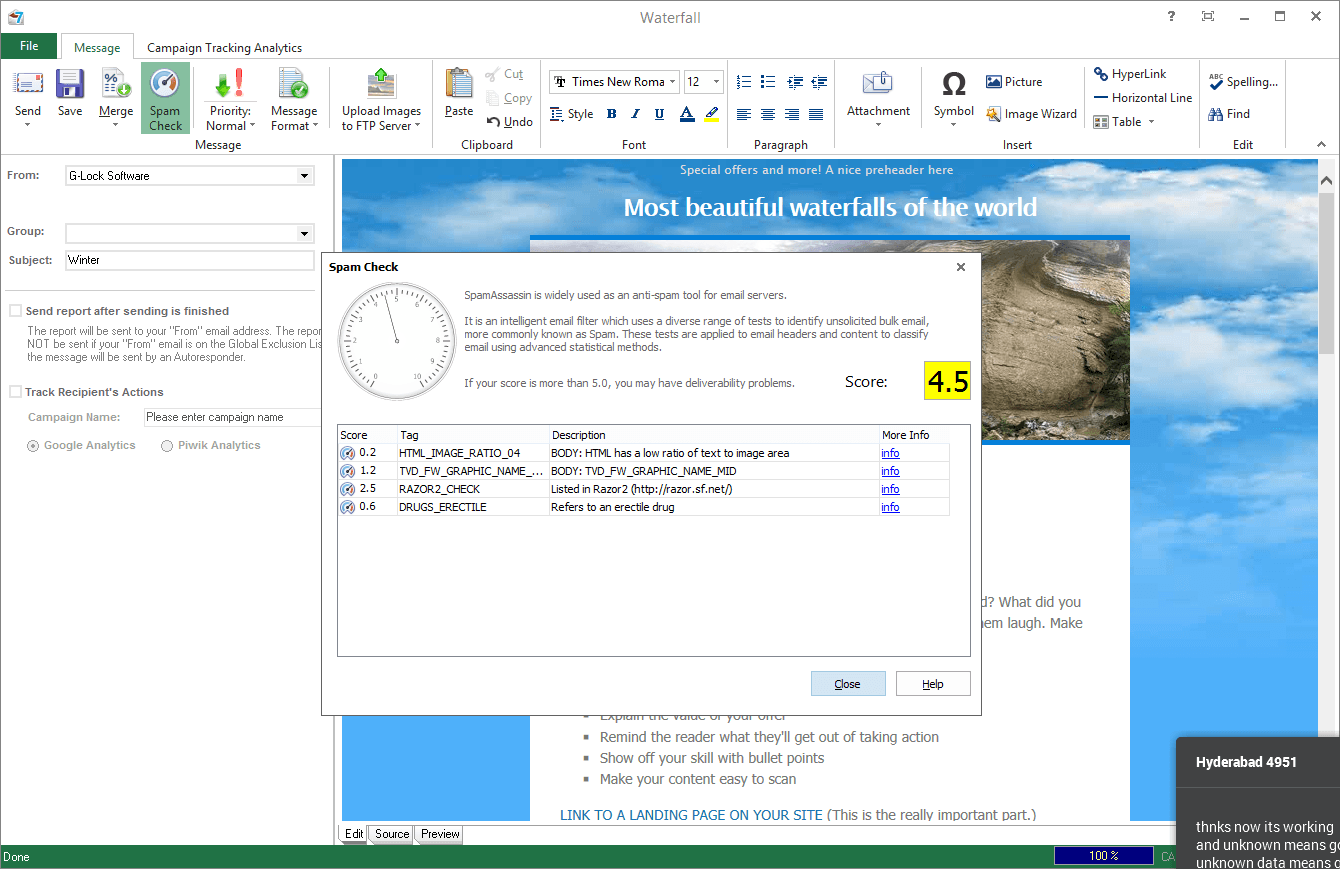
Added: G-Lock Analytics email tracking statistics overview to the program. If you use G-Lock Analytics to track your email campaigns, now you can see the statistics overview right inside G-Lock EasyMail7. Just click on "Click to View Stats" link for the message in the Outbox or Autoresponders.
The Overview shows the open rate and click rate, the number of opens, clicks, forwards, and unsubscribes. Plus, you can quickly see how many recipients read, glanced and skimmed your email.
To get the full campaign statistics, click on "View Details". You will be redirected to the campaign reports in your account on G-Lock Analytics website.
Latest upstream components updates.
version 7.2.1, July 15, 2014
Added: “Set the Rowset Size to 1” option. You can check this option if you get ‘Invalid Cursor Position’ error while sending to the group.
Added: Bounce_Type and Bounce_Date in the saved file in the Bounce Handler.
Fixed: %%Return_Email%% and %%From_Email%% merge tags.
Few small improvements.
version 7.2.0, June 26, 2014
Added: full integration with G-Lock WPNewsman plugin. You can use WPNewsman completely free to collect subscribers on your site. Then you can create a link to the subscribers’ lists stored in WPNewsman through API and send emails to the subscribers using G-Lock EasyMail7.
Added: “Send report after sending is finished” option.
Added: bulk start/stop sending capability in the Outbox. You can select several messages at a time and click the Start or Stop button.
Added: ability to quickly insert most popular symbols into the message subject and body.
version 7.1.0, June 4, 2014
Added: autoresponders.
Added: export of the date and time for each sent message.
Fixed: wrong sending date in the messages sent by the scheduler.
Latest upstream components updates.
version 7.0.9, May 8, 2014
Fixed: when using email throttling per hour, the program stopped on itself after several hours.
Fixed: after the deletion of a contact group, a new group with emails did not show without the EasyMail7 Server re-start.
version 7.0.8, April 14, 2014
Added: simple web interface.
Added: encrypted connection between the EasyMail7 Server and Client and ability to change the security option in the EasyMail7 Server Settings.
Added: new sending mode – sending through multiple SMTP servers.
Added: ability to reset the SuperAdmin password. Refer to “Admin User Guide” that can be downloaded here.
Added: pagination in the Outbox.
Added: “Keep only last sending log” option to the scheduler settings.
Added: global exclusion list.
Added: “Add all unsubscribes to the Global Exclusion List” option to the account settings in the Bounce Handler.
Fixed: user logged in as ‘user’ did not have permissions to create a segment from the group and create an account in the Bounce Handler.
Changed: algorithm of how the program forms the recipient’s “To” field.
version 7.0.7, March 19, 2014
Added: “Image Wizard” option that allows to re-size and compress the image and insert it into the template or message.
Added: ability to copy email addresses to clipboard using Ctrl+C in the Bounce Handler.
Added: ability to paste email addresses from clipboard to the exclusion list using Ctrl+V.
Latest upstream components updates.
version 7.0.6, March 3, 2014
Added: “Import from clipboard” option for “Contacts” (Ctrl+V also works).
Added: “Import form Zip file” and “Import from eml file” options to the File menu in the Edit Message screen.
Added: ability to sort templates in the category by From, Date, Subject and Template Name.
Added: “Export to Zip file” and “Export to Eml file” options for templates.
Added: new responsive templates to the Template Store.
Fixed: Bounce Handler crashing on systems with a non-English date format.
Fixed: memory leak when sending emails through Amazon SES.
Improved: work with MySQL databases.
Improved: Template Store.
Read more information about new features here
version 7.0.5, January 31, 2014
Added: fields showing the date of creation, limits per day, limits per hour and existence of custom header fields in the “Email Server Accounts”.
Added: search option for email server accounts.
Added: ability to delete multiple messages from the Outbox at once.
Added: “Insert ‘List-Unsubscribe’ field into the message header” option in the Workplaces Settings-> Custom Header Fields.
Added: “Insert ‘Precedence: Bulk’ field into the message header” option in the Workplaces Settings-> Custom Header Fields.
Added: option to save sent and failed emails from the Outbox to a csv file.
Added: ability to cancel scheduler and save email as draft.
Added: US West (Oregon) region and EU (Ireland) region endpoints for Amazon SES API in the Email Server Account Settings.
Fixed: memory leak problem in the Bounce Handler.
Fixed: occasional “Item not found” error when searching all contact groups.
Changed: when adding a duplicate contact to the group, the program asks if you want to update the contact information or not instead of the “Bad request” error.
version 7.0.4, January 14, 2014
Watch this video to learn about new features of G-Lock EasyMail7 v7.0.4.
Added: ability to segment groups and send the message to a segment.
Added: ability to get folders from the FTP server and select a “Remote Path” folder in the FTP Server Settings.
Added: ability to define custom header fields for each account in the Account Settings.
Added: ability to process unsubscribe requests.
Fixed: upper case letters in URLs were changed to lower case letters.
Changed: view of custom fields in the group (each custom field is placed in a different column).
Changed: the “Save” option now saves the file in the format compatible with the import.
Latest upstream G-Lock EasyMail7 updates.
version 7.0.3, December 17, 2013
Watch this quick video to learn about new features of G-Lock EasyMail7 v7.0.3.
Added: “Copy selected contacts to”, “Move selected contacts to” options that allow to copy and move selected contacts to a different group.
Added: “Add and Create Copy” option on the “Add Contact” window.
Added: auto-refresh after saving changes in the template.
Added: group merge preview capability.
Added: “Insert into database” Bounce Handler action.
Added: “Rename Category” option. Added: ability to add custom header fields in the Workplace Settings.
Fixed: the program did not remember the “Delete message from server” action for a POP3 account in the Bounce Handler Account settings.
Fixed: when email tracking was enabled, links behind pictures were not replaced by tracking links.
version 7.0.2, December 4, 2013
Fixed: the merge tag “tag://%%unsubscribe%%” is replaced by the unsubscribe link from G-Lock Analytics if you enable email tracking.
Improved: EasyMail7 Client’s GUI for small resolutions of the screen such as 1368×768 and large fonts.
Other hot fixes reported by our users.
version 7.0.1, December 2, 2013
First public release
How G-Lock EasyMail7 Differs from Older Versions
G-Lock EasyMail7 is the great leap forward in email marketing applications for Windows and it’s far ahead of older versions of G-Lock EasyMail and it’s outdated competitors. G-Lock EasyMail7 is designed to help you stay in touch with your clients, prospects and subscribers in a more convenient and easy way, and eliminate the complexity and expense of operating a third-party email service.
If you are a customer of G-Lock EasyMail v6, check the below list of new features that differ G-Lock EasyMail7 from old versions:
– G-Lock EasyMail7 is built on client-server model and includes two components: EasyMail7 Server and EasyMail7 Client. The EasyMail7 Server can be installed on a local computer or a Windows Server 2008/2012, Amazon EC2 or Windows Azure Virtual Machine where you can deploy your own customized Windows Server. It runs as a service in the background and does most of the work: send out messages, check for incoming returned messages and update the contact lists. The EasyMail7 Client can be installed on as many computers as you want which means you can access your data on the EasyMail7 Server from Client and send email campaigns from anywhere.
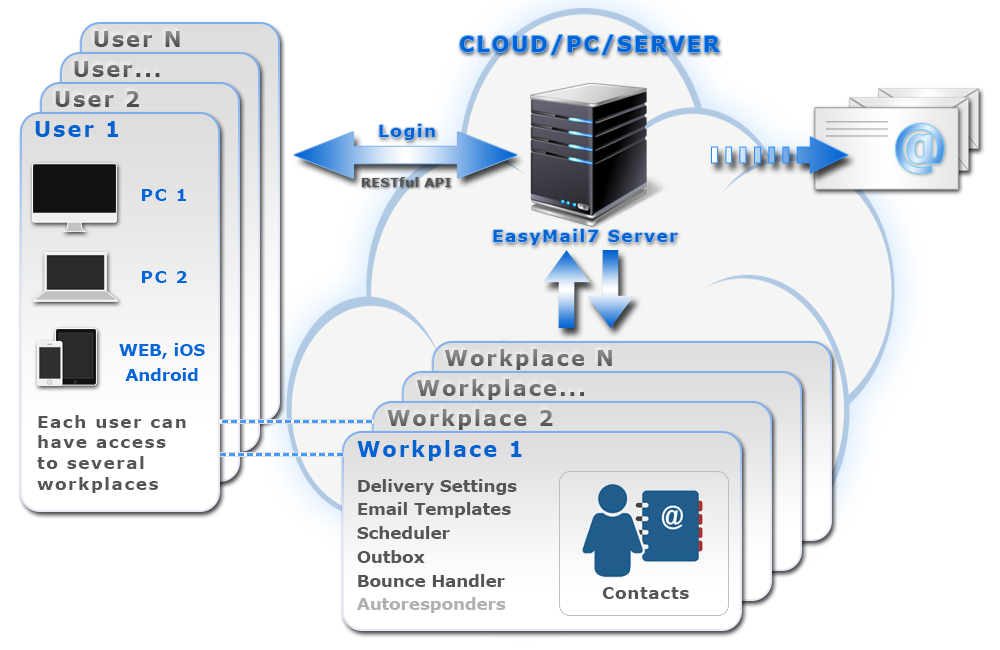
G-Lock EasyMail7 client-server model
– Ability to create multiple users and workplaces. A workplace includes email server accounts, email templates and drafts, sent items, contact groups (internal and external lists), and Bounce Handler settings. If the license allows, admin can create many users and workplaces. Users login to the EasyMail7 Server from their computers and manage email lists and campaigns. Each user has the full control under his own workplace(s) allocated to him by admin. The program even allows multiple users to work within the same workplace simultaneously.
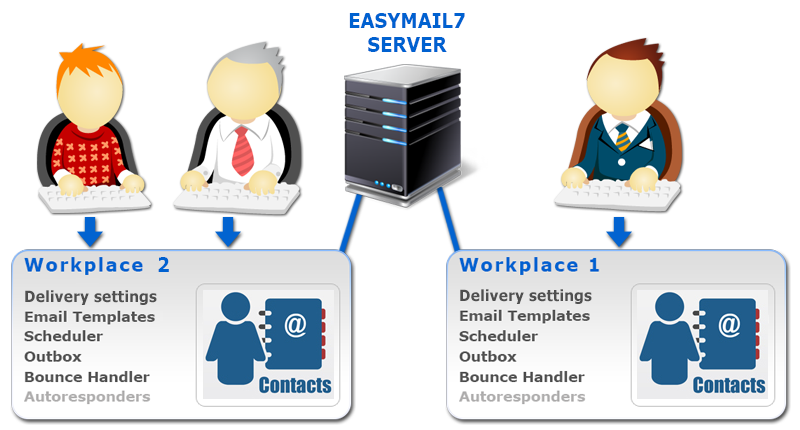
Each user has the full control under his own workplace(s)
– Sending to multiple groups at a time. The program automatically skips duplicate email addresses between groups.
– Easy group creation and import of contacts without Import Wizard. If your contacts are stored in the MS Access, MS Excel 97-2003, MS Excel 2007-2013, CSV Text file, MySQL or MS SQL server database, G-Lock EasyMail7 allows you to quickly create a group directly from the file/database without using the Import Wizard. It takes just a few mouse clicks.
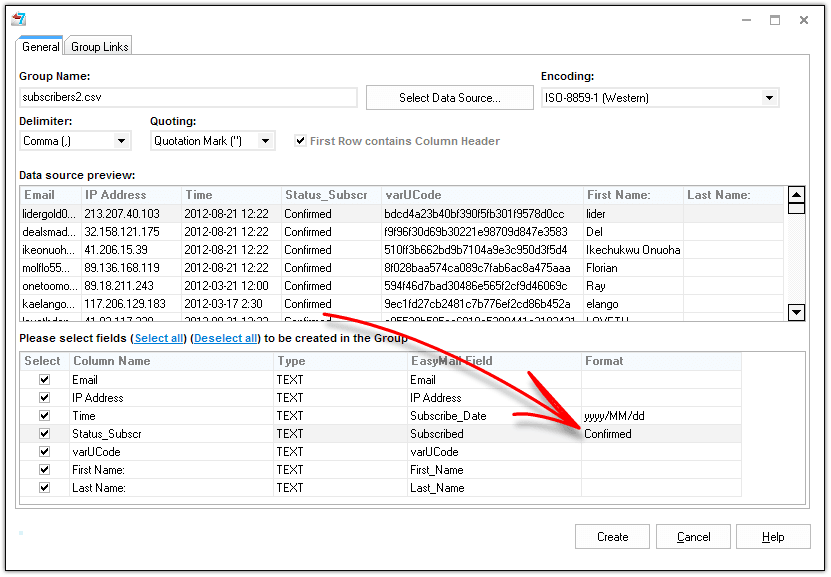
Easy group creation and import of contacts without Import Wizard
– Integration with Google Analytics and Piwik Analytics to track the recipient's actions on your website. You can find out how many customers you're attracting, how your recipients are engaging with your site, and how much revenue they generate.
– Customizable unsubscribe link. G-Lock EasyMail7 provides you a ready to use unsubscribe link that you can merge into the message. You can customize the unsubscribe link as you like and even have different unsubscribe links for different groups.
– Bulk subscribe/unsubscribe capability. You can subscribe and unsubscribe recipients in bulk in one or all groups by loading email addresses from a file.
– New Bounce Handler that can automatically unsubscribe or delete bounce email addresses from internal groups, update external databases and delete bounce emails from external databases.
– Built-In FTP client. You can upload pictures used in your message to your web server directly from G-Lock EasyMail7. The program will then automatically replace local paths of the images in the message with the paths on the web. This helps you decrease your message size, increase the sending speed and ensure the pictures will be displayed correctly within the message. Plus, you save your money if you send using a 3rd party service for example Amazon SES where they charge you for data transfer.
– Built-in store of professionally designed HTML email templates including responsive templates. You can download the templates from the store and use them for your email newsletters. You can customize the templates as you like. Use the newsletter templates that come with G-Lock EasyMail7 to share how-tos, tips, and news of interest with customers.
– RESTful API. Using RESTful API you can integrate G-Lock EasyMail7 into your business process. For example, we have a web client developed with the use of RESTful API.
– Unlimited features in ANY paid version. The license price depends on the number of users and workplaces you can have within G-Lock EasyMail7. There are no limitations in features for paid licenses. We do not try to upsell you to more expensive licenses so you can access specific features. We simply charge a fixed price per user/workplace.You can be assured that whatever size of business you are and whatever paid license you have, you will always have access to all G-Lock EasyMail7 features.