
How to Use Amazon SES and EasyMail to Send Bulk Email Newsletter
This tutorial is for G-Lock EasyMail v6.xx.
You can read the tutorial how to send emails using Amazon SES API in G-Lock EasyMail7 here
Amazon Simple Email Service (Amazon SES) is a highly scalable and cost-effective bulk and transactional email-sending service for businesses and developers. Subscription is quick and is on pay-as-you-go basis. You can read more about Amazon SES here.
When Use G-Lock EasyMail with Amazon SES?
- when you don't have your own SMTP server
- when you can't use your ISP mail server due to restrictions on sent emails
- when you can't afford high montly fees charged by email service providers
What Do You Get When You Use G-Lock EasyMail with Amazon SES?
- you send bulk emails at an insanely low price, yet with no loss of quality in terms of deliverability. Compared to other ESP (email service providers) which can charge you up to $200 for 10 000 messages, Amazon SES is 200x cheaper — just $1 per 10 000 messages.
- you ensure a high deliverablity rate — your emails will pass SPF and Sender ID policy checks enforced by many ISPs and DKIM-sign.
- you don't care about feedback loops — Amazon SES will send you an email once someone of your recipients reports your message as spam and G-Lock EasyMail built-in Bounced Manager will extract the recipient's email address from the feedback loop email in order you can take the recipient off your list.
Watch this video to learn how to setup G-Lock EasyMail to send the messages through Amazon SES API.
To send emails with G-Lock EasyMail using Amazon SES API, do this:
Go to the Amazon SES website http://aws.amazon.com/ and click "Signup".

If you don't have an account with Amazon yet, create an account. If you already have an account, login.
After login, click on your account and select "Security Credentials".
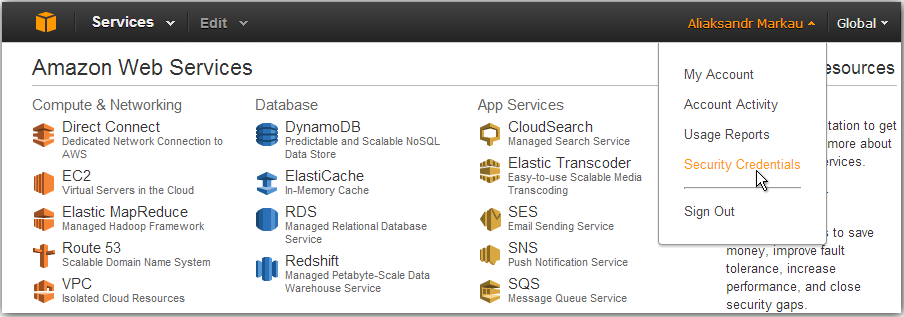
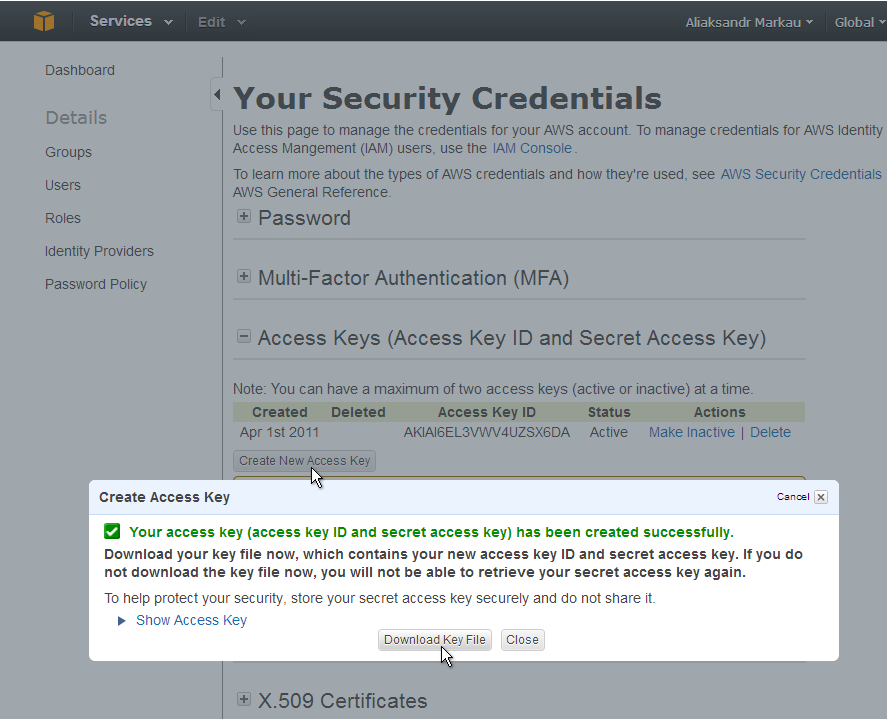
Deploy the Access Keys section.
Click on the "Create New Access Key" button.
Click on "Download Key File" button to download your Access Key and Secret Access Key in a file.
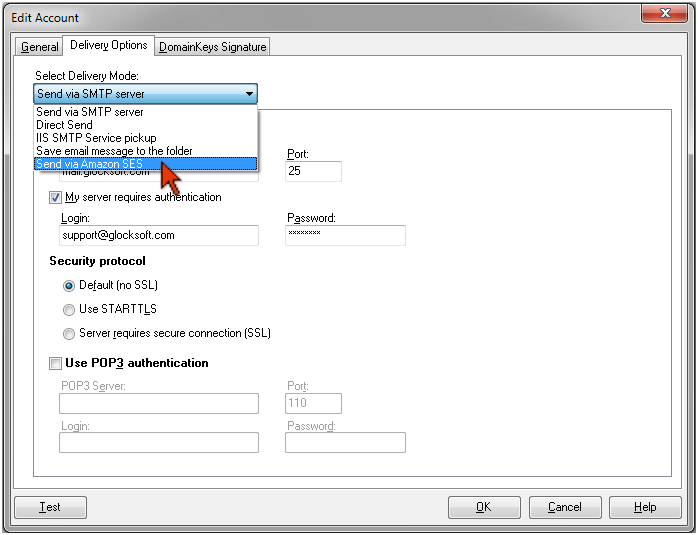
Open G-Lock EasyMail, click on the “Accounts” menu and then click on “Add New Account”.
Enter the sender information under the General tab.
Click on the Delivery Options tab and select the "Send via Amazon SES" delivery option.
Open the downloaded rootkey.csv file.
Copy everything after AWSAccessKeyId= and paste it into the Access Key field.
Copy everything after AWSSecretKey= and paste it into the Secret Key field.
Click on "Verify Sender Email" button. Amazon SES will verify your From and Return email addresses used in G-Lock EasyMail Account by sending an email to those email addresses. You must click on the link in the verification email. After this, those emails will be added to your verified email list.
Click on "Get Verified Email List" button to display your verified email addresses.
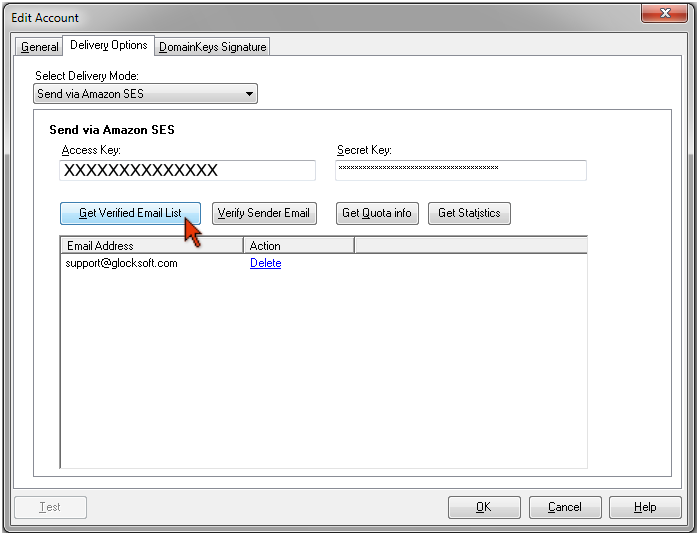
Click on the "Get Quota info" to show your quota on Amazon SES.
When you use the Amazon SES API, G-Lock EasyMail7 automatically controls your sending limitations to comply with your Max Send Rate on Amazon.
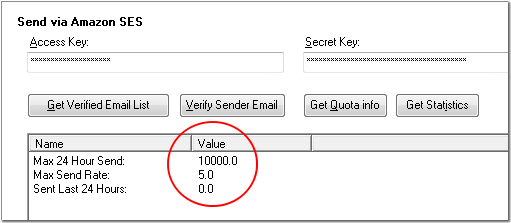
As a new user, you will be in the Amazon SES sandbox — an environment where you can evaluate Amazon SES in a nonproduction mode. In the sandbox, you can send email only to addresses that you have verified. While this should be sufficient for testing purposes, we recommend that you request production access to Amazon SES as soon as possible.
If you have recently been granted production access to Amazon SES, you should be able to send up to 10,000 emails per 24-hour period. Your sending quota should increase as follows:
Desired Quota (Per 24-Hour Period) | Approximate Time Required |
| 10,000 | Immediately |
| 100,000 | 10 days |
| 1,000,000 | 2 weeks |
You can read more information about the sending quota and rate limit here.
After you enter the account information in G-Lock EasyMail, click OK to create the account.
Create the email, select the group and your Amazon SES API account in the From field and send the message.
include:amazonses.com
Amazon recommends that all AWS Email Service users publish both SPF and Sender ID records to their DNS. For more information, go to the Amazon Simple Email Service Developer Guide.
SPF DNS record example: v=spf1 a mx include:amazonses.com -all
Many domain registrars provide self-service tools for administering DNS records. You can use these tools to modify your domain's DNS records, or contact your registrar for assistance.
In addition to using Amazon SES API as described in this tutorial, you can use Amazon SES SMTP interface to send email messages.
If you need help with Amazon SES, check out these resources:
Amazon SES Getting Started Guide (provides instructions for using the service for the first time)
Support Center (the home page for AWS Technical Support, including access to Developer Forums, Technical FAQs, Service Status page, and Premium Support (if you are subscribed to this program)).
Premium Support Information (the primary web page for information about AWS Premium Support, a one-on-one, fast-response support channel to help you build and run applications on AWS Infrastructure Services).
Contact Us (a central contact point for inquiries concerning AWS billing, account, events, abuse, etc).
Conditions of Use (detailed information about copyright and trademark usage at Amazon.com and other topics).
Ray Greenberg
| #
Two things: Can I use Glock Easy on more than one machine? Also do you know of a place where I can find testimonials from Amazon SES users?
Julia
| #
Hi Ray,
You can install and use G-Lock EasyMail on two machines, for example, on your desktop and on your laptop.
As to testimonials from Amazon SES users, you can look for testimonials at Amazon SES forums. Here is the link to the results I found:
https://forums.aws.amazon.com/search.jspa?objID=f90&q=easymail&x=0&y=0
Cat
| #
Will SES tell me which emails bounced and will your sofware handle removal of such bounced emails after a pre-set number of bounces?
Julia
| #
Yes, if you send emails with G-Lock EasyMail using the Amazon SES settings, bounce emails will arrive at the email address you typed in the “Return email address” in G-Lock EasyMail Account settings. Then you can process bounce emails using the Bounced Manager module in G-Lock EasyMail. The Bounced Manager will extract the email addresses from bounced messages and save them to a file. Then you can remove those emails from your groups in G-Lock EasyMail address book or add bounce email addresses to the exclusion list in the address book.
If you want to delete bounce email addresses directly from your database, you can use our G-Lock Email Processor software instead of the Bounced Manager module in G-Lock EasyMail.