
You can use our plugin right out-of-box. It's pre-configured with email templates and action pages used in the confirmed opt-in process. You can fully customize them through your admin panel to fit your marketing needs

You can import CSVs contacts in a matter of seconds and be ready to mail in just minutes. No messing around with re-confirmation of leads or facing an inquisition about how you built your list. You have FULL control of your email campaigns.

Zero monthly fees saves you a fortune in autoresponder costs. Send emails for FREE or enhance delivery with third party senders like Amazon SES.

Best newsletter plug-in, support is excellent!
„I would recommend this plug-in to absolutely everyone as a must-have in your WordPress toolkit.
I was having a strange problem with not being able to send out test newsletters, and within a few hours Alex had everything running perfectly!
Awesome plug-in + fantastic support = win!“
aWEBthatWORKS

Great, professional service and super product
„I'm delighted with this plugin and the service provided by the G-Lock team. Set up is mostly automatic. You can edit welcome messages (etc.) very easily and personalize to your desires.
Great, GREAT product. Definitely removes all expenses associated with setting up and maintaining a professional-quality newsletter and mailing list. Your 1-time annual payment is definitely worth it!“
Gillian Chabrol Grannum, Ph.D.
Because they realize that WPNewsman is a powerful yet easy to use and customize self-hosted newsletter solution for WordPress -- no-brainer alternative to restrictive email service providers with expensive monthly plans.
Your subscriber base is growing and so is the cost per campaign. Going for the monthly plan with email service providers means wasting more money if you don’t send newsletters regularly enough. And the bigger your subscriber base becomes, the more expensive it is to communicate with them. Doesn't it drive you mad?
Well, we hate limits and restrictions, we hate that every time we want to send a newsletter, we must upload our list into a 3rd party database... It’s like we are not owning our lists and emails.
That's why we developed WPNewsman for you. With WPNewsman newsletter plugin, you get complete freedom and full control over your lists and messages at a lower cost. And the best part is that you can use WPNewsman absolutely FREE if you have a small list up to 2000 subscribers or just started online business.

WPNewsman integrates directly with WordPress for the ultimate ease and flexibility. It installs as a regular plugin so you have FULL control of your email campaigns and your are not relying on third party services that ultimately control you at their whim.
After the installation, you can start using WPNewsman right within minutes as it is pre-configured to collect the subscribers' email addresses and names. It’s supplied with default email templates and action pages used in the confirmed opt-in process.

You can collect email subscribers either from the sidebar widget or shortcode-supported double opt-in forms. You can add and remove fields and options to customize the signup form as you like.
You can embed opt-in forms anywhere on your WordPress site and create multiple mailing lists using different forms. Plus, you can embed the subscription form on an external site and use your custom css to customize the form and match your site theme.

Unlike other email service providers, you can import your existing subscribers from a CSV file into your WordPress database and get started in just minutes. No re-confirmation of subscribers is required.
In addition to importing, you can manage your leads as you want: export collected subscribers to a file, manually unsubscribe users, delete users, change the subscriber’s status to confirmed or unconfirmed, and re-send confirmation emails to unconfirmed subscribers with one mouse click.

With WPnewsman you can send awesome emails and look more professional than your competitors. You can create your own layout in any HTML editor and import it into WPNewsman or use built-in email templates to create beautiful HTML email newsletters.
For email personalization, you can use short codes supported by the plugin and merge the subscriber’s data, your social profile links such as Twitter, Facebook, Google+ and LinkedIn and other fields into your email newsletter. You can also quickly add an unsubscribe link to your newsletters and use an instant unsubscribe process or confirmed opt-out process to make your emails compliant with the CAN-SPAM Act.

You can customize the From name, From email address and Return email address and choose the suitable delivery mode including your custom SMTP server, Amazon SES, SendGrid or any other email service SMTP settings. You can send newsletters immediately or schedule them at any date or time and throttle email newsletter sending to respect the SMTP server restrictions.
WPNewsman keeps your list private and secure. Our plugin does not expose your subscribers' list to the list members. Each subscriber sees only his/her email address in the To field when they receive your newsletter.
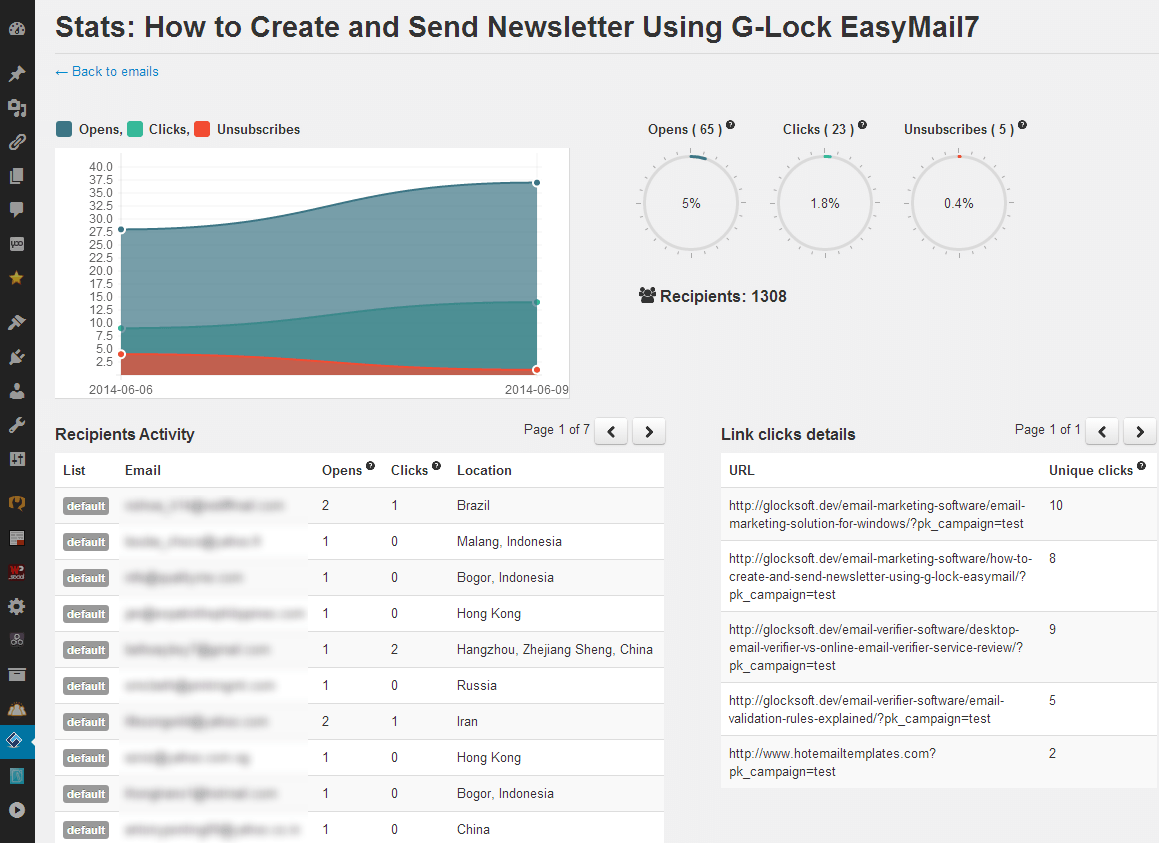
Done right, email tracking can be an extremely powerful tool for measuring email campaign performance. You can play with subjects, layouts, call-to-actions, and text and monitor email tracking statistics from campaign to campaign. And finally you will come up with the perfect email campaign that will inevitably lead to sales.
Our WPNewsman plugin is supplied with an incredible email tracking capability so that you can estimate how your email performed after sending. You do not need to insert any tracking code into your email messages. The plugin uses the built-in tracking system that provides you with email tracking statistics for each sent message.

Bounced emails can be a real problem if not handled in a timely manner because continuous sending to invalid users leads to your IP address being blacklisted by your ISP and hurts your sender reputation.
With that in mind, we added the Bounced Handler module in the Pro version of WPNewsman to help you keep your lists cleaned from bad (hard bounce) email addresses. The plugin automatically unsubscribes hard bounce emails so you don't need to worry about doting it manually.
