
Define Custom Rules for Email Verification
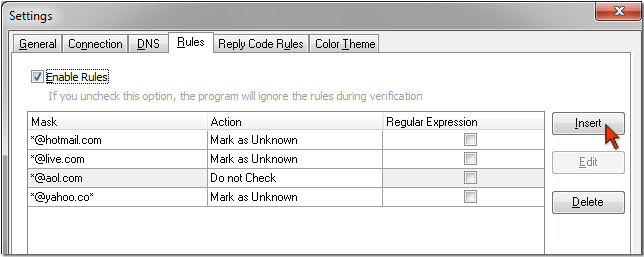
Advanced Email Verifier provides you with a flexible system of rules to process the email addresses. You can add your own rules, or you can use the default set rules. Why is this useful? It speeds up the verification process and saves your time.
Advanced Email Verifier classifies the email addresses as good or bad based on the response it receives from the mail server. The program imitates sending a message to the email address. If the mail server confirms that the user exists, Advanced Email Verifier disconnects and marks that emails address as good. If the server says that there is no such user, AEV marks the email address as bad. But some SMTP servers are configured to receive all the messages without checking if the appropriate mailbox exists or not. Such email addresses cannot be verified without sending a real message to them.
In order not to waste time, you can set the rule — mark all the email addresses from the xxxx.com domain as 'Unknown'. The Advanced Email Verifier won't try to verify the xxxx.com emails and will mark them as 'Unknown' automatically. For your convenience you can quickly switch the rules to On/Off using the "Enable Rules" option.
After you send your newsletter to such users, you will see if the message bounces or not. If it bounces, the email address is not valid. At this point you can use the Advanced Email Verifier built-in bounce handler to process those bad email address that cannot be determined during the email list verification.